
















PURCHASE ORDER MANAGEMENT

Every order.
Every detail.
Under control.

Make approved purchasing a clear commitment.
Connect people, suppliers and finance
around the purchase order.

Multi-level approvals Multi-currency
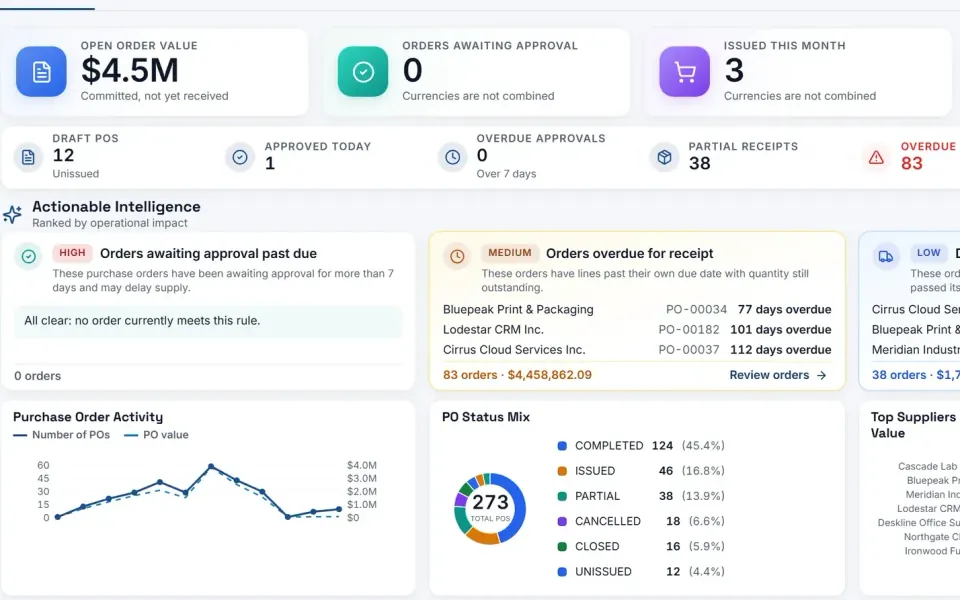
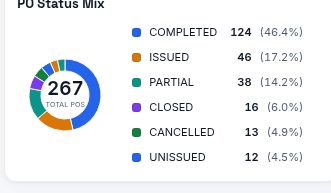
eBuyerAssist 2.0 purchase order dashboard: open order value, orders awaiting approval and receipt, drafts and overdue receipts, actionable intelligence ranked by impact, order activity and status mix.
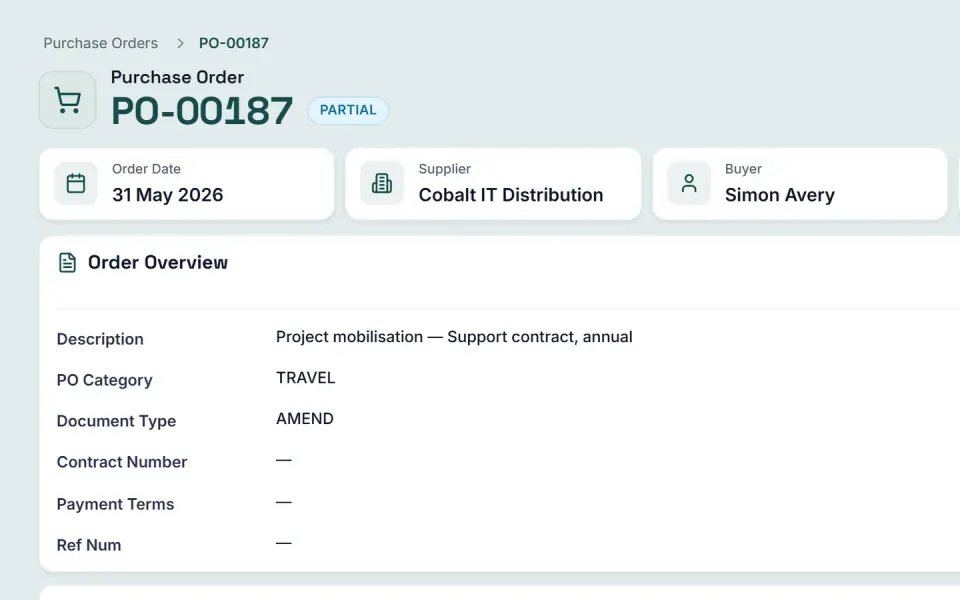
eBuyerAssist 2.0 purchase order record: order date, supplier, buyer and approval status, the order overview, supplier and delivery details and the order total.
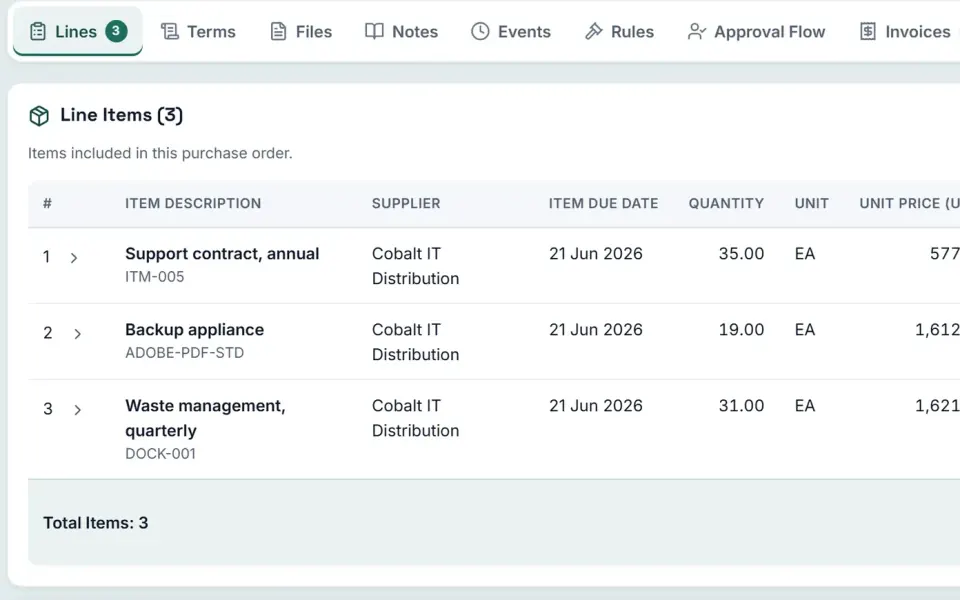
eBuyerAssist 2.0 purchase order lines: items with quantities, unit prices, received quantities and line totals.

Genuine eBuyerAssist 2.0 screens · demo data, not customer results

Trusted by teams with more to manage.

THE HEART OF YOUR PURCHASING PROCESS

A shared understanding.
Before anyone places an order.

Define the goods or services, agreed prices and purchasing terms in a controlled record. Give buyers and suppliers a clear understanding of the commitment.

eBuyerAssist connects order creation, approvals and tracking with the wider procurement process—bringing purchasing decisions and financial accountability together.

INSIDE EBUYERASSIST 2.0

Purchase orders,
as your team sees it.

Genuine application screens from the eBuyerAssist 2.0 demo tenant.

eBuyerAssist 2.0 purchase order dashboard: open order value, orders awaiting approval and receipt, drafts and overdue receipts, actionable intelligence ranked by impact, order activity and status mix.

Purchase order dashboard. Every order's status at a glance, with the exceptions ranked by operational impact.

  • eBuyerAssist 2.0 purchase order record: order date, supplier, buyer and approval status, the order overview, supplier and delivery details and the order total.

    The purchase order

    One purchase order: header, supplier, delivery and totals, with its approval status.

  • eBuyerAssist 2.0 purchase order lines: items with quantities, unit prices, received quantities and line totals.

    Lines and receipts

    The order's lines, with what has been received against each one.

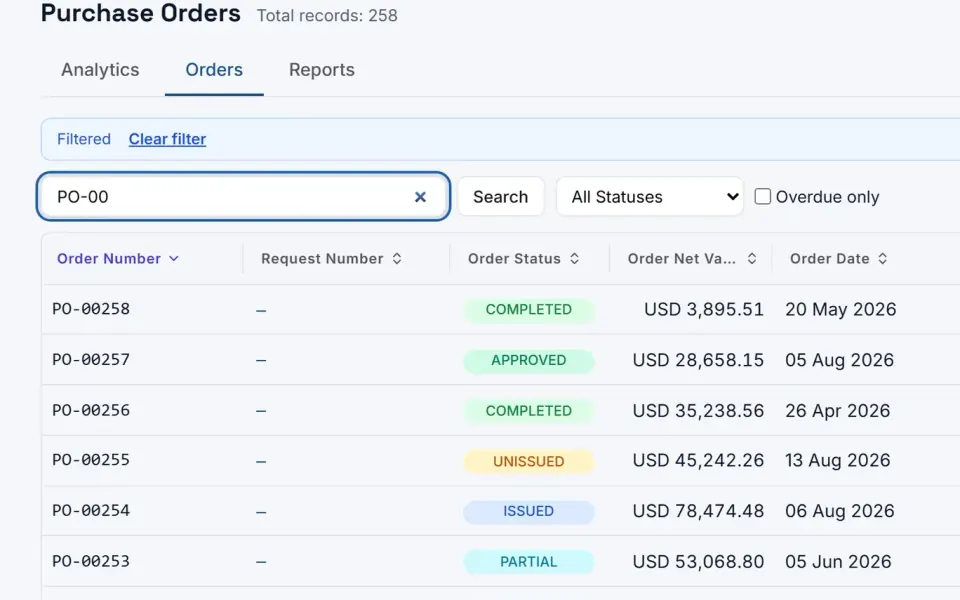
  • eBuyerAssist 2.0 purchase order register: a searchable, filterable table of orders with status, value, date, supplier and description.

    The order register

    The order register: search, filter by status, choose columns and export.

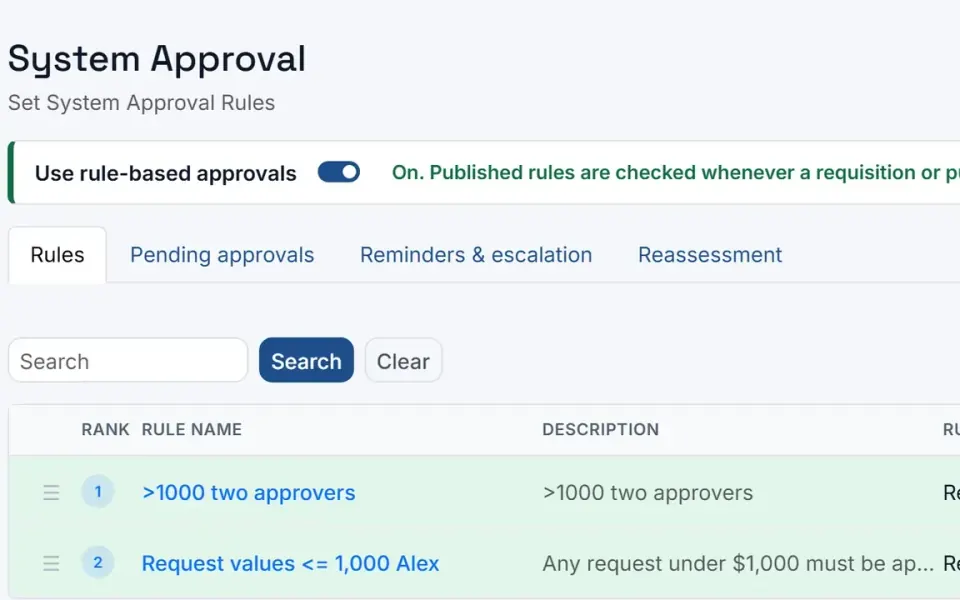
  • eBuyerAssist 2.0 system approval rules: rule-based approvals switched on, with rules for requisitions and purchase orders by value and the number of approvers.

    Approval rules

    Rule-based approval: which documents a rule applies to, the amount thresholds and the approvers it requires.

Genuine eBuyerAssist 2.0 screens · demo data, not customer results

A CONNECTED PURCHASE-TO-PAY JOURNEY

Less chasing.
More moving forward.

See how each step connects.
Explore a workflow built around
control, clarity and continuity.

03 / ORDER

Turn an approved request into a clear commitment.

Create purchase orders with the items, prices, delivery instructions and commercial terms your suppliers need.

  • Multi-currency purchase orders
  • Personalized document formats
  • Controlled changes and audit trails
Explore purchase orders
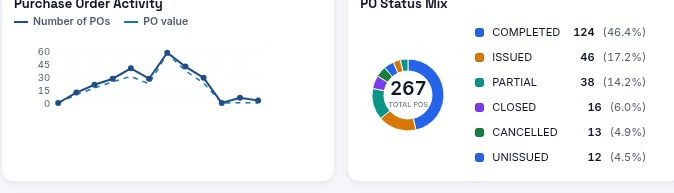
● ● ●eBuyerAssist / OrderDETAIL VIEW
Actual eBA 2.0 detail: Purchase order activity and status analytics

Selected details from eBuyerAssist 2.0 · Development data — not customer results

DETAILS THAT MAKE THE DIFFERENCE

Built for real-world
purchasing.

Structured approvals

Apply multi-level signoffs and financial authority to the purchasing process.

Financial coding

Allocate costs across account codes with split financial allocations.

Multi-currency purchasing

Record purchasing commitments in the relevant transaction currency.

Flexible item entry

Use internal catalogs, free text or vendor punchout within your purchasing workflow.

Your document formats

Personalize PO documents with logos, signatures, terms and instructions.

A traceable record

Maintain controlled changes and audit trails as purchasing progresses.

Read the complete purchase order module information
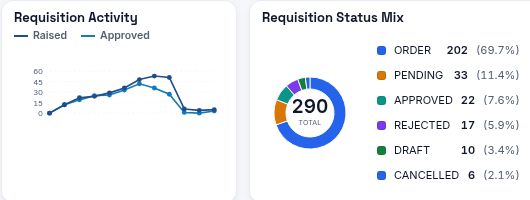
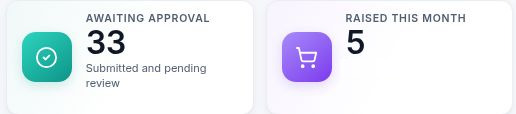
Requisition analytics
Actual eBuyerAssist 2.0 Requisition analytics
The detail you need. In one place.

Selected details from eBuyerAssist 2.0 · Development data — not customer results

INTELLIGENCE, WITHOUT THE NOISE

See the signals.
Understand the story.

From purchasing activity to approval bottlenecks, bring operational detail into a view your team can act on.

See it in your own context

MAIN FEATURES

Purchase orders
at a glance.

  • One requisition, one order per supplier
  • Multi-level order approvals
  • Line-level coding with split allocations
  • Multi-currency purchasing
  • Branded PO documents with your logo
  • Orders emailed to suppliers
  • Catalog, free-text, import and punchout lines
  • Amendments with re-approval and audit trail
  • Order dashboards and scheduled reports

IN EBUYERASSIST 2.0

How it works
in more detail.

What the current version of eBuyerAssist does, each with an example of it in practice.

4 capabilities, each with an example

One requisition, an order for each supplier

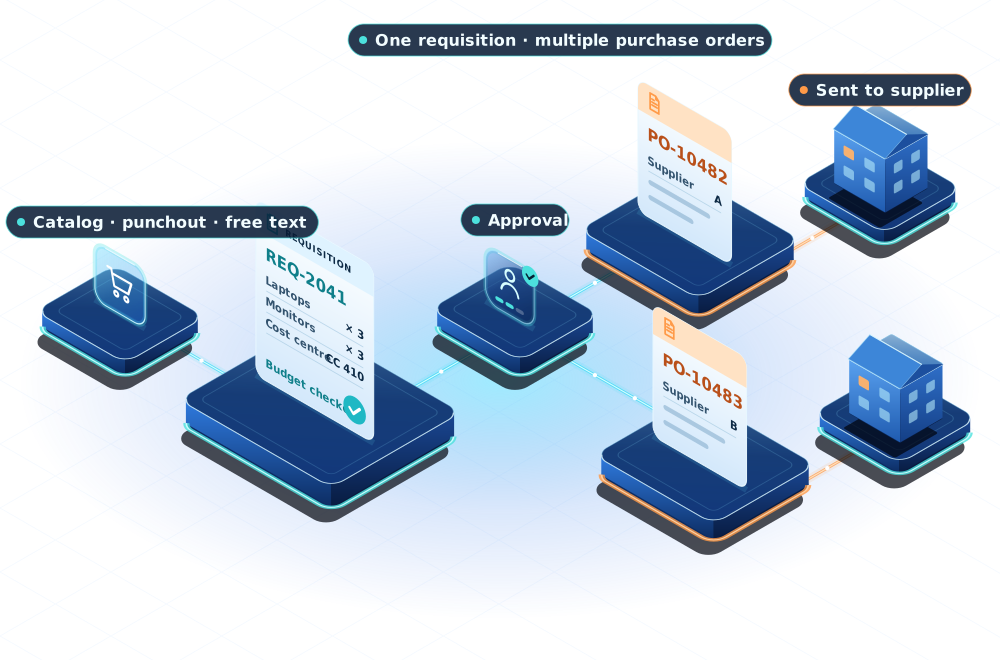
eBuyerAssist 2.0 turns an approved requisition into purchase orders in one step, creating a separate order for each supplier named on its lines. Each order line keeps the coding of its requisition line, so buyers do not re-key anything and every order traces back to the approved request.

For example, a hotel chain’s requisition for linen, cleaning supplies and kitchen equipment from three suppliers becomes three purchase orders, one per supplier, in a single step once it is approved.

Line-level coding and split allocations

eBuyerAssist 2.0 codes requisitions and purchase orders line by line. Each line carries its own values for the accounting fields your organisation uses, such as cost centre, project or GL account, and a new line starts with the previous line's coding to save re-keying. Where your set-up allows, a line can be split by percentage or by amount, with each share budgeted and approved against its own coding.

For example, a university can code each line of an order to the project it belongs to, and split a shared equipment line across two research projects, with each project's share checked against its own budget and approval limits.

Multi-currency purchasing

eBuyerAssist 2.0 lets each requisition and purchase order use its own currency, carried from the requisition to the order. Exchange rates are maintained by administrators or refreshed from an optional rate service, approval limits work on base-currency amounts, and an issued order keeps the exchange rate of the day it was issued.

For example, a manufacturer buying from suppliers in Germany and Japan can raise orders in euros and yen, while managers approve them against limits set in its home currency.

Purchasing and spend reporting

eBuyerAssist 2.0 includes purchase order and requisition dashboards, and standard reports such as a purchase order register, spend by supplier, category and requester, outstanding orders and approval turnaround, which can be scheduled for email delivery.

For example, a finance director can have an approval-turnaround report emailed every Monday and review outstanding orders before month end.

A LITTLE MORE CLARITY

Good questions.
Clear answers.

Can one requisition create more than one purchase order?

Yes. Eyvo supports generating multiple orders from one requisition, so purchasing can organize commitments across suppliers.

How does accounting allocation work?

Purchase orders support multiple account codes and split financial allocations, keeping the purchasing record connected with financial coding.

Can our purchase order documents reflect our business?

Eyvo supports personalized PO formats, including logos, signatures, purchasing terms and delivery, payment and invoice instructions.

What connects the PO to the rest of the process?

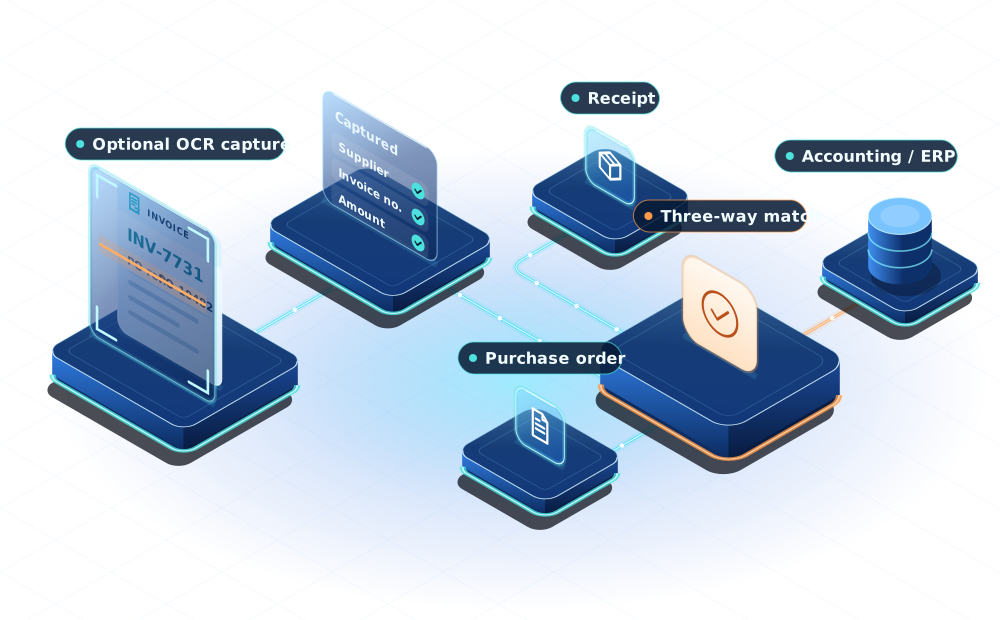
Receiving, invoice matching, contracts and accounting integrations connect the order with related procurement records. Choose the modules and scope that match your process.

THE COMPLETE PICTURE

Purchase Order Software

Our purchase order software ensures control and compliance and lets you monitor and verify your purchasing activities.

Eyvo's end-to-end PO software for smarter approvals and spend control

With multi-level approvals, real-time PO visibility, customizable formats, and seamless integration into larger procurement workflows, Eyvo's Purchase Order Software module, a fundamental component of its eProcurement platform, simplifies and automates the creation, approval, tracking, and management of purchase orders. This helps businesses enforce compliance, control spend, reduce unapproved buying, and ensure auditability.

Procurement’s Heart And Soul

As you might expect, the PO module is the heart of any purchase order software. Surprisingly, many companies simply don’t use purchase orders. We believe this is a fundamental error in business practice. The lack of using purchase orders allow opportunities for misunderstandings to take place between buyer and seller.

A correctly formatted and approved purchase order document assures that you are not open to misuse and maverick buying. In other words, purchase orders curtail people picking up the phone to place an unapproved order with a supplier.

Advantages Of Using Purchase Orders

  • Having a properly constructed purchase order system allows you as the buyer to explicitly state what you wish to buy, at what price, and under what terms.
  • It may also specify your policies on the acceptance of the goods/services and your policies on rejects and returns. This is crucial information that both parties to the transaction should be aware of prior to entering into the transaction. This eases the payment of the eventual invoice.
  • A centralized control point not only helps curtail unwanted or unapproved spending but also assists in seeing the overall spend through management reports.

Purchase Order Workflow.

Streamline your procurement process effortlessly with Eyvo's Purchase Order Software.
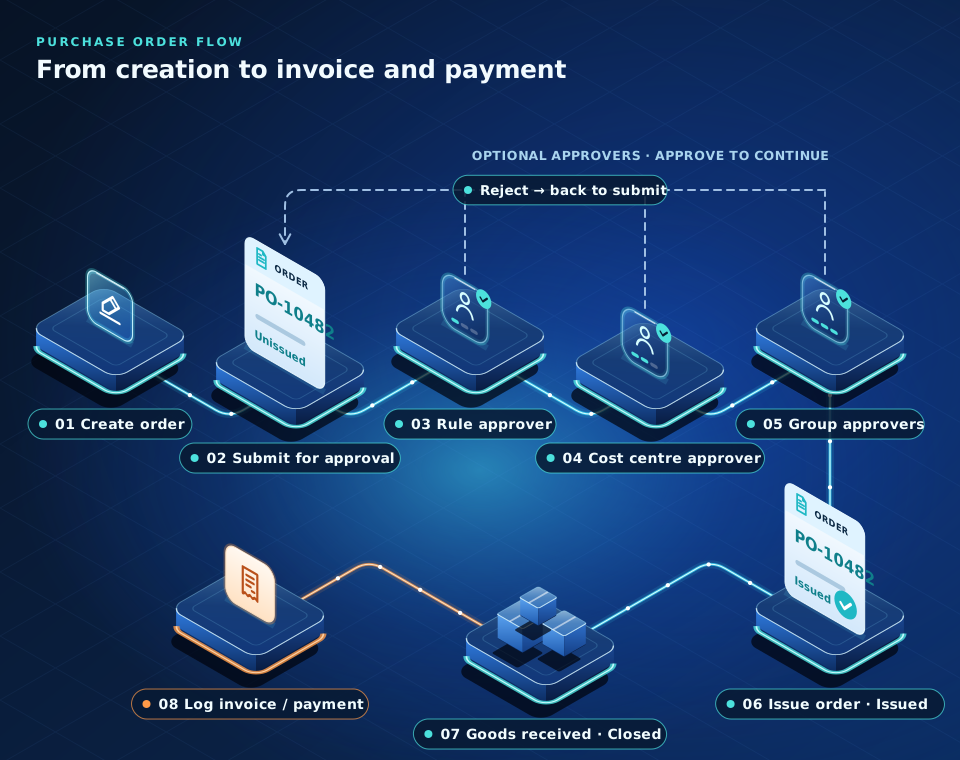
Diagram of the purchase order flow: creation, submission, three optional approvers that can reject the order back to submission, issue, goods receipt and invoice and payment logging. Each step is described below.
The purchase order flow in eBuyerAssistOriginal Eyvo diagram
Text version: 8 steps
  1. Create purchase order
  2. Submit for approval The order is submitted for approval. Its status is Unissued.
  3. Rule approver (optional) Approve to continue, or reject to return the order to Submit for approval.
  4. Order cost centre approver (optional) Approve to continue, or reject to return the order to Submit for approval.
  5. Order group approvers (optional) Approve to continue, or reject to return the order to Submit for approval.
  6. Preview / issue order The approved order is previewed and issued. Its status is Issued.
  7. Goods received The goods are received. The order status is Closed.
  8. Log invoice / log payment

For more information, you can

Request A free Demo

of our system.

Advantages Of Using Purchase Orders

  • One requisition can generate multiple orders
  • Multi-currency
  • Explicitly specify delivery, payment and invoice instructions
  • Multiple account codes with split financial allocations
  • Multi-level signoffs and approvals based on role
  • Supports internal catalogs, free text and vendor punchout as standard
  • Allows for personalized PO formats with logos and scanned signatures
  • Fully details all terms and conditions of purchase
  • Controlled change management with audit trails

Legislation & Compliance

A Purchase order document allows for easier auditability, traceability and most importantly accountability. If you are a publicly traded company then you will be aware of Sarbanes-Oxley (SOX) compliance measures. Furthermore, we have internal systems in place with our platform that empower buyers to trace any errors on their POs to the suppliers before the suppliers are aware of such errors. This allows the Approvers to only approve valid requests that they know are within budget.

Such enforcement of personal accountability within your organization ensures visibility of the process from request initiation to final payment of the invoice – this is important if you wish to implement best practices within your organization. Eyvo’s eBuyerAssist cloud-based purchase order software system can do exactly that – putting you in control of your spend and ensuring vendor compliance with all your transactions.

For more information please Contact Us!
FREQUENTLY ASKED QUESTIONS (FAQs)

What are the benefits of purchase order (PO) software?

Purchase Order (PO) Management Software assists in creating, tracking, and managing purchase orders. It allows organizations to automate, document, and consolidate procurement-related activities, thus enhancing purchasing.

What is a purchase order software?

Eyvo’s digital Purchase Order software can digitize, streamline, and automate purchasing processes, including creating, managing, and tracking POs. Our software enables your business to effortlessly handle procurement tasks, ensuring transparency, accuracy, and compliance with your internal policies.

Does Eyvo have a PO tracking system?

Yes, we do. You can monitor the status of your POs in real time, and you get visibility into key details such as approvals, order fulfillment, etc. This ensures transparency across the procurement lifecycle.

Can we approve purchase orders on the go?

Yes, you can. You can approve or reject orders through Eyvo’s Mobile App, Microsoft Teams, and Slack as well. This way, important orders that need immediate attention can be approved on time - even when users are away from their desks.

Why should I choose Eyvo as my purchasing software?

Eyvo consistently develops innovative, state-of-the-art purchasing software while being known for customising procurement processes as per our client's requirements. Our commitment to user-friendly design, advanced analytics, and excellent customer support makes us a preferred choice for global businesses.

SEE WHAT CONNECTED CAN DO

Make room for
better procurement.

Let’s put your people, your processes and
your priorities at the center of the conversation.

sales@eyvo.com London · San Francisco · Mumbai

Plan your personalized demo

Tell us a little about your team and your purchasing process.
Fields marked optional can be left blank.

Modules you are interested in (optional)

We use your details to respond to your request and, where the law allows, to send you occasional emails about Eyvo’s products and events. Every marketing email has an unsubscribe link. Read Eyvo’s privacy notice.

Make yourself comfortable.

Accessibility & display preferences

Text size
100%

Preferences are saved in this browser. Your operating system’s reduced-motion setting is always respected.

Accessibility information